Designing helpful playground features
Learners design a playground feature using simple machines to make it fun, safe, and easy for many different people to use.



Overview
In this hands-on activity, learners apply their understanding of simple machines to design a playground feature. They sketch, label, revise, and explain how simple machines can support fun, safety, and inclusive playground designs.
Instructions
What you'll need
- Designing Helpful Playground Features Slideshow
- My Playground Feature Design Activity Sheet
- Simple Machines Briefing Cards
- Guide to Success: Playground Feature Design
- Cut-Out Labels Sheet
- Paper, pencils, colored pencils
- Paste or glue
- Optional: small recycled/reused items (e.g., tubes, caps, boxes, string)
- Chart paper (optional)
Start the Thinking
- If learners completed Activities: How do simple machines help us and/or Choosing helpful simple machines for playgrounds, briefly revisit shared ideas about what makes a simple machine helpful:
- makes work easier, and
- keeps people safe.
If not, introduce these ideas using familiar playground examples.
- Display an image of the BC Hydro recreational site and present the challenge:
Design a playground feature that uses at least two simple machines and is safe, fun, and easy for many people to use (inclusive).
- Invite learners to think about:
- Who might use this space?
- What kinds of play might happen here?
- What challenges or opportunities do you see?
- Distribute the My Playground Design Activity Sheet. Invite learners to sketch a quick first idea for a playground feature that could fit this space. Explain that this is a first draft and will be revisited later.
Grow the Thinking
- Display slides showing playground structures. Explain that many playground features combine two or more simple machines working together. Invite learners to identify:
- which simple machines are being used,
- how they help people play, and
- What evidence they see.
- Provide pairs of students with the Simple Machines Briefing Cards. Invite learners to review how each machine works and connect this information to what they noticed in the images. Invite groups to brainstorm playground structures they have seen or could imagine.
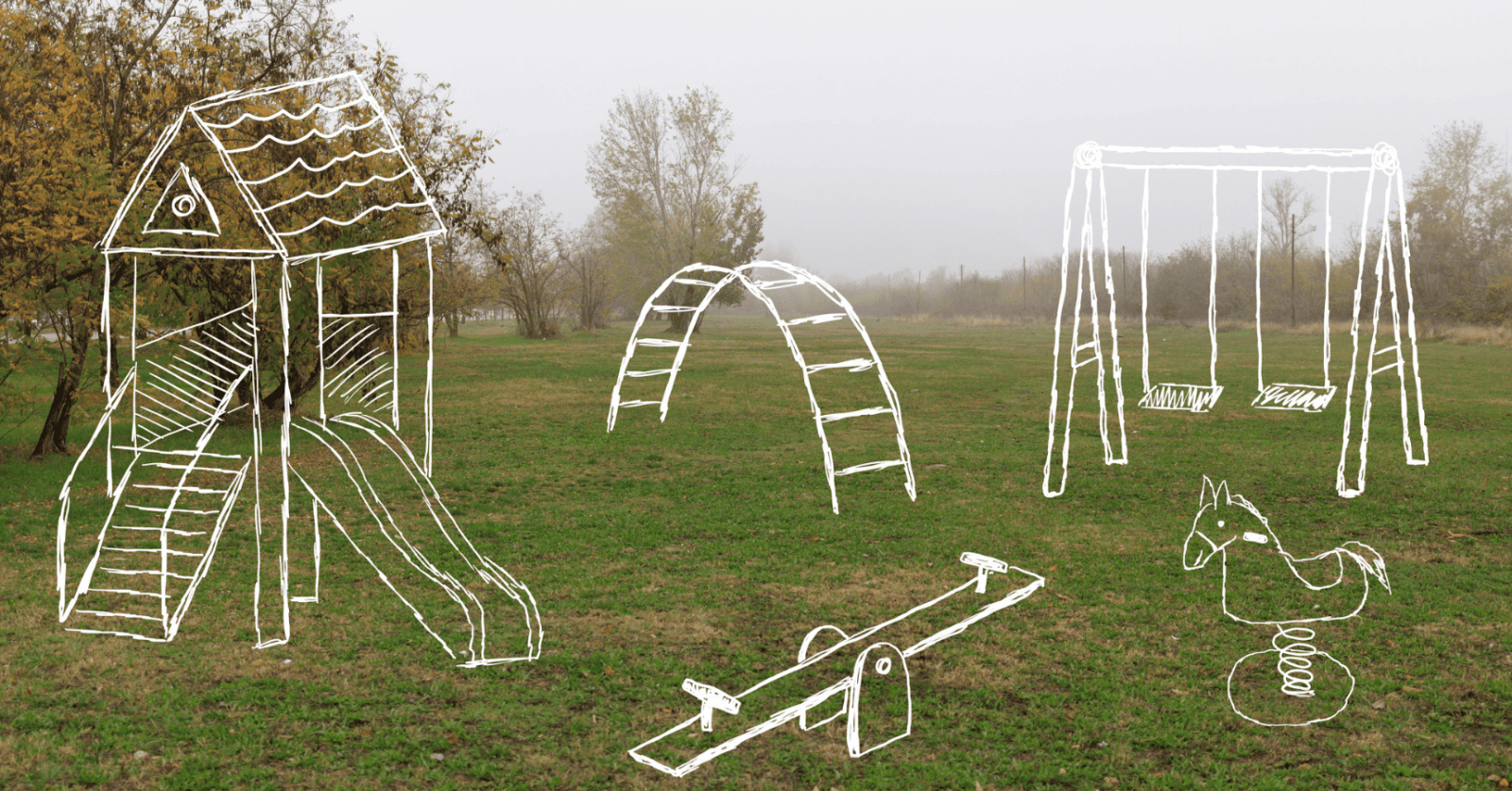
- Display an image showing many playground structures. Ask learners to compare their ideas with the image. Ask:
- Which ideas do you see here?
- Which ideas are not shown?
- What simple machines might be used in these structures?
Encourage learners to think about how different structures could meet the needs of different users.
- Explain that learners will now develop their designs. Review the design criteria:
A playground feature is effective when it:
- is easy to use
- keeps people safe, and
- is fun to use.
- Invite learners to revise or extend their initial sketch. Ask them to:
- design a feature using at least two simple machines,
- label where each machine is used, (invite learners to use the Cut-Out Labels), and
- explain how each one helps make the feature easy, safe, and fun to use.
You might also invite a brief discussion about why using reused materials can support care for the land and responsible use of resources.
- As learners work, prompt them to connect their ideas to the criteria and to evidence from earlier simple machine activities.
Reflect on the Thinking
- Have learners re-examine their designs using the criteria. Ask them to identify:
- Which criteria does it meet most strongly?
- How could it be even more helpful?
- Have learners share their design with a partner or small group. Invite partners to offer one suggestion linked to the criteria.
- Ask learners to reflect on the feedback and then revise their designs.
- Invite learners to share or display their completed designs.
Modify or extend this activity
Modifications:
- Using fewer images and completing parts of the design together as a class
- Allowing oral, audio, or video explanations instead of written responses
- Providing sentence starters (e.g., “This works because…”, “I notice…”, “A clue is…”)
- Offering a word bank (e.g., lift, push, pull, safer, easier, balance, include)
- Having learners work in pairs with shared responsibility (designer / recorder)
- Focusing on two criteria (e.g., safe and easy to use) for younger learners
Extensions:
- Inviting learners to redesign their structure for a different group of users or to better support a specific group of users
- Conducting a “simple machines walk” in the school or community or finding a playground structure and suggesting how simple machines might help make it safer, fun, or inclusive?
- Adding an energy reflection:
How does this design help people use effort (energy) wisely and safely? - Connecting to sustainability by exploring recycled or natural materials
- Inviting learners to use simple recycled or reused materials (e.g., cardboard tubes, bottle caps, string, small boxes) to create a quick model showing how part of their design works. Emphasize that the goal is to explore how materials and movement affect effort, safety, and ease of use, not to build a finished product.
Curriculum Fit
Core competencies
Communication
- Connecting and engaging with others
- Acquiring and presenting information
- Focusing on intent and purpose
Thinking
- Questioning and investigating
- Analyzing and critiquing
- Reflecting and assessing
- Evaluating and developing
- Generating and incubating
- Creating and innovating
- Designing and developing
Personal and Social
- Building relationships
- Contributing to community and caring for the environment
- Valuing diversity
- Resolving problems
- Understanding relationships and cultural contexts
- Recognizing personal values and choice
Science 3-6
Big ideas
- Thermal energy can be produced and transferred. (Grade 3)
- Energy can be transformed. (Grade 4)
- Machines are devices that transfer force and energy. (Grade 5)
- Newton’s three laws of motion describe the relationship between force and motion. (Grade 6)
Content
- transfer of thermal energy (Grade 3)
- Energy:
- has various forms
- is conserved (Grade 4)
- devices that transform energy (Grade 4)
- properties of simple machines and their force effects (Grade 5)
- Machines:
- Constructed
- found in nature (Grade 5)
- Newton’s three laws of motion (Grade 6)
- effects of balanced and unbalanced forces in daily physical activities (Grade 6)
Curricular competencies
Questioning and predicting
- Observe objects and events in familiar contexts (Grade 3, 4)
- Identify questions about familiar objects and events that can be investigated scientifically (Grade 3, 4)
- Demonstrate a sustained curiosity about a scientific topic or problem of personal interest (Grade 5, 6)
Planning and conducting
- Make observations about living and non-living things in the local environment (Grade 3, 4)
- Experience and interpret the local environment (Grade 5, 6)
Applying and Innovating
- Contribute to care for self, others, school, and neighborhood through personal or collaborative approaches (Grade 3, 4, 5, 6)
- Co-operatively design projects (Grade 3, 4, 5, 6)
- Transfer and apply learning to new situations (Grade 3, 4, 5, 6)
Communicating
Express and reflect on personal or shared experiences of place (Grade 3, 4, 5, 6)
Assessments
Opportunities for assessment are embedded throughout the activity. Teachers may use:
- Observation of learners’ design sketches and labels
- Listening to discussions for use of evidence and criteria
- Review of designs for clarity, detail, and accuracy
- Noting how learners revise and strengthen their ideas
- Learners’ ability to explain how simple machines support safety, ease of use, and inclusion
- Use of the Guide to Success: Playground Feature Design to support feedback
These observations support feedback on communication, reasoning, design thinking, and reflective learning.
Teaching Notes
These notes offer optional guidance to support planning and facilitation. Teachers are encouraged to adapt the activity to suit their learners and setting.
They include suggestions for:
- selecting and using images
- supporting inclusive design
- using criteria effectively
- supporting explanation and revision
- managing time
Learning Launch
- Choose images with clear, visible use of simple machines.
- Allow quiet thinking time before discussion.
- Encourage learners to point to specific visual evidence.
- Record learners’ language when charting early ideas.
- Reduce the number of images if working with younger learners.
Developing Understanding
- Model how to analyze an image using think-alouds when helpful.
- Use learners’ language when co-constructing criteria.
- Encourage attention to effort, safety, and access—not only “fun” or appearance.
- Prompt learners to support ideas with evidence from images or experience.
Reflect and Refine
- Emphasize that revising ideas is expected and valued.
- Encourage learners to link revisions directly to criteria.
- If learners struggle, suggest adding details rather than starting over.
- Ask learners to explain why their thinking changed.
Supporting Explanation and Student Voice
- Learners may show understanding through:
- drawings, partial sentences, gestures, or oral explanations.
- Accept developing explanations and use questions to clarify rather than correct.
- Encourage learners to listen to and build on one another’s ideas.
- Affirm that multiple designs may meet the criteria in different ways.
Using Criteria with Grades 3–6
- Emphasize that designs may meet criteria more strongly in some areas than others.
- Revisit and refine criteria if needed.
- Connect to science concepts (force, effort, balance) where appropriate.
Time Management
If time is limited, prioritize:
- partner discussion
- one design draft
- brief feedback
- short revision
Reflection may be continued in a later class if needed.
Career Connections
On this tab, you’ll find information about careers that students may be inspired to explore after completing this activity. These profiles highlight real roles and in related fields, helping students see how the skills, knowledge, and interests they are developing can translate into meaningful career pathways. Use this section to spark curiosity, encourage future planning, and show students the many ways they can contribute to a cleaner, more sustainable future.
Below are some potential career paths connected to this activity:
Playground designers, engineers, and park planners use simple machines and design principles to create safe, inclusive, and engaging public spaces.
Many BC Hydro employees work in planning and maintaining recreational areas.
Activity Materials
Select what you need below.

921.1 kb • pdf
110.5 kb • pdf
114.9 kb • pdf
189.8 kb • pdf